

U-Shaped Drawer Boxes (also referred to as Under Sink Pull Outs or Under Sink Cabinets) can be ordered the following ways:
- Order on Anytime® Online. View instructions below.
- Or complete the U-Shaped Drawer Box Order Form. Then, email or fax it to Customer Service.
Order on Anytime® Online
- On the Build page, add "Drawer Boxes" to your order.
- Select the style, material, finish, hardware, notching, and if applicable, top edge profile and top edge finish.
Note: U-Shaped Drawer Boxes are only available with style codes 601, 613, 618, 619, 659, and 661.
- Click "Save".
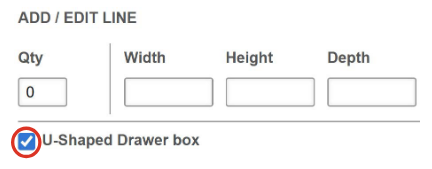
- Enter the quantity, width, height and depth.
- Click the checkbox to the left of "U-Shaped Drawer Box". An additional dialog box will appear.
- Next, submit a drawing of the drawer box by selecting the icon below. You may submit a drawing of your own or
use a drawing template.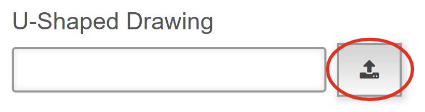
Note: To download a drawing template, click the ? symbol to the right of "U-Shaped Drawer Box".
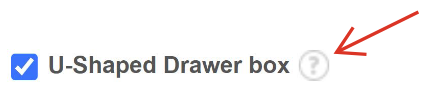
A new dialog box will appear. Click "More Details".
The template will appear in your Internet browser. Download the template from your browser.
Complete the template and verify that the measurements are the same in your drawing and Anytime® Online.
Save as a PDF and upload it to your Anytime® Online order by clicking the icon to the right of “U-Shaped Drawing” as shown in step #6.
- Select "Choose a File to Upload (PDF, Image Format)". Then, select the drawing file from your computer and click "Open".
- Enter a "Name" for the file and click "Add".
- Lastly, using the drawing on the right as a reference, enter dimensions for Size A, Size B and Size C. Verify that the measurements are the same in your drawing and Anytime® Online.
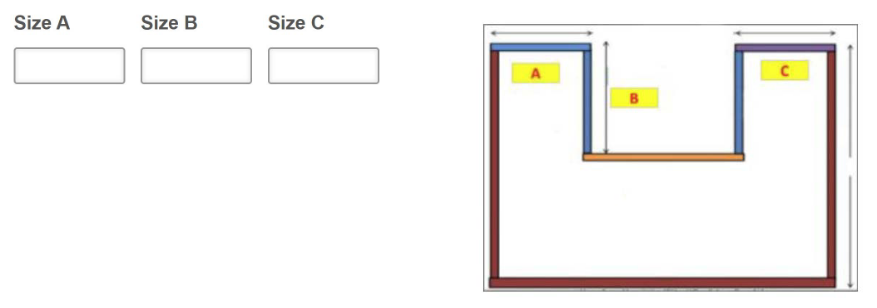
- When finished, click "Add".
More Drawer Box Options
Find other ways to customize with drawer box options such as adding dividers, scoops, logo engraving, and more.
New to Anytime® Online?
Learn how to start an online order by viewing the tutorial "Anytime Online Account Management- Beginning Your Order".